
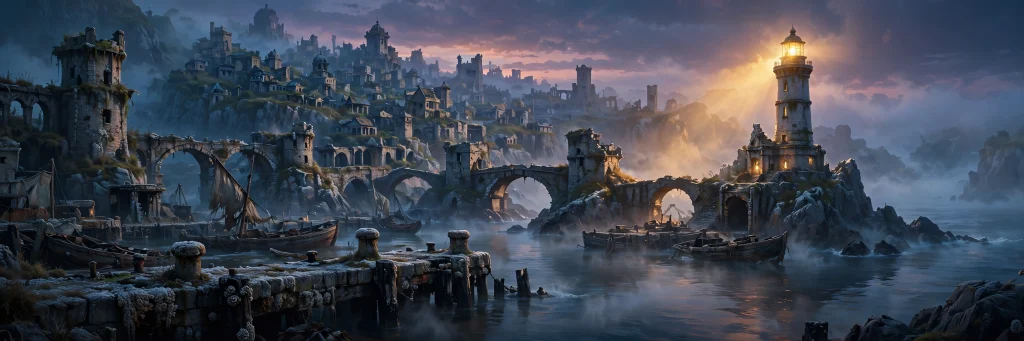
Fantasy environments become memorable when they look as though someone could live, travel, or get lost in them. A castle on a mountain may communicate the genre, but the details around it tell the story: the road leading to the gate, the abandoned market below, the light in a window that should be empty.
For writers, game designers, and independent filmmakers, AI image generation can help explore those details before committing to a final visual direction. The useful question is not whether a generator can produce an attractive fantasy landscape. It is whether the image communicates the setting your story requires.
This guide uses a fictional game project called The Salt Crown. Its locations and production decisions are hypothetical examples of how a creator might develop a fantasy environment.
Start with what the location does in the story
Before writing a prompt, explain the location’s role in one sentence. Is it a place of safety, a warning, a destination, or an obstacle? The answer determines what deserves visual attention.
In The Salt Crown, imagine that the player approaches a coastal city after a storm. The city once controlled a valuable sea trade route, but its harbor has been abandoned for decades. The player needs to understand two things immediately: the city was once wealthy, and entering it now feels uncertain.
Those ideas are more useful than a list of generic fantasy adjectives. Wealth might appear through large stone arches, decorated harbor buildings, and an elaborate lighthouse. Abandonment might appear through damaged mooring posts, empty walkways, and vegetation growing between paving stones.
A creator exploring those ideas might use an ai image generator no restrictions to develop several visual directions. No Restrictions AI offers a browser-based text-to-image workflow, but the creator still needs to judge whether each result supports the story and the intended use.
Write the location as a set of relationships
A strong environment prompt explains where things are. It gives the model a hierarchy rather than asking every object to compete for attention. For the abandoned harbor, the relationships could be:
- A broken stone pier leads from the foreground toward the city.
- The lighthouse stands above the city on the left.
- The empty harbor occupies the center of the image.
- A single illuminated window appears high in the lighthouse.
- The open sea remains visible behind the city.
This arrangement tells the viewer where to look and suggests a path through the scene. The illuminated window can create a question: who is still inside?
The details also serve different purposes. The pier establishes a route, the lighthouse identifies the location, and the empty harbor supports the story of abandonment. If an object does not contribute to the scene, it can be removed or simplified.
Build a visual brief before adding style words
A useful starting prompt includes the location, time, point of view, major objects, and lighting. Once those elements are clear, add a medium or visual style.
For example:
“Wide fantasy environment illustration of an abandoned coastal city after a storm. A damaged stone pier leads from the foreground toward an empty harbor. Weathered trading buildings line the water, and an old lighthouse rises above the city on the left. One small window glows warmly near the top of the lighthouse. Wet stone, low clouds, pale morning light, distant sea visible beyond the city. Quiet, mysterious atmosphere, readable architecture, no text.”
This prompt gives the image a visual structure. It also contains several checks: the city should be coastal, the harbor should feel empty, the pier should lead into the scene, and the lighthouse window should remain visible.
If the result looks appealing but places the lighthouse behind the city, decide whether that change weakens the brief. A dramatic skyline may be useful for exploration, but if the lighthouse is the player’s destination, it needs to be easy to identify.
Control the viewer’s route through the image
Fantasy environments often become crowded because every part of the prompt asks for attention. A giant moon, glowing runes, dozens of towers, dragons, storms, and a detailed crowd can all be interesting separately. Together, they may obscure the location’s purpose.
For The Salt Crown, a simple visual route could start at the pier, move through the empty harbor, and end at the lighthouse window. Light, contrast, and scale can support that route.
Ask for the foreground to be darker or simpler if it competes with the destination. Request a clear gap between the lighthouse and nearby buildings if the silhouette is difficult to read. If the harbor becomes too dark, specify reflected morning light on the water while keeping the abandoned mood.
The goal is to make the image easier to understand, not merely to add more detail.
Create variations that answer different design questions
Instead of generating several unrelated images and choosing the prettiest, assign each variation a question.
The first variation might ask: What does the player see on arrival? It should show the harbor, pier, and destination from a distance.
The second might ask: What does the market district feel like at street level? The camera can move closer to shuttered stalls, salt-stained signs, and empty passageways.
The third might ask: What is inside the lighthouse? That image could focus on a circular staircase, an old chart table, and the source of the warm light.
These images belong to the same world, but they have different jobs. A distant establishing image communicates geography. A street-level image communicates texture and scale. An interior image creates a more intimate story question.
Keep a short world guide
When developing multiple images, write down the details that should remain stable. For the fictional city, the guide might say:
Architecture: pale stone, narrow arches, copper roof details. Weather: damp, overcast, with occasional warm interior light. Harbor: abandoned but once wealthy. Lighthouse: tall, weathered, with one illuminated upper window. Color palette: gray-blue sea, muted stone, small areas of amber light.
Reuse the guide as context, then add the specific composition for each image. This gives the series a consistent visual language without forcing every result to look identical.
A generator may still reinterpret details between images. Compare the lighthouse shape, building materials, and color palette rather than assuming repeated wording guarantees continuity. If a selected model supports reference-based editing, an approved image may also be useful as a reference for the next stage.
Review an environment like a production asset
An image can be beautiful and still fail the assignment. Review it at the size and crop where it will actually appear. A wide environment image used as a website banner needs a different focal arrangement from a vertical book illustration or a small game card.
For the harbor scene, ask:
| Question | Why it matters |
|---|---|
| Can the viewer identify the lighthouse quickly? | It is the scene’s destination. |
| Does the pier create a readable route? | It helps the player understand how to enter the city. |
| Does the harbor look abandoned? | It shows the abandonment that supports the story context. |
| Are important features visible at a small size? | Fine details may disappear in a thumbnail. |
| Does the image leave space for interface elements / text? | The final layout may cover part of the artwork. |
If the lighthouse is too small, revise its scale or position. If the scene feels populated, remove market crowds and active ships from the brief. If the image looks like a modern port, specify older construction materials and the absence of contemporary equipment.
When testing an unrestricted ai image generator, keep these acceptance criteria beside the prompt. They make it easier to decide whether a result needs a small correction, a different composition, or a completely new direction.
Save the decision, not just the image
For each useful image, save a short note explaining why it was selected. For example:
“Selected because the pier creates a clear route to the lighthouse. The harbor feels empty, but the single warm window gives the scene a story question. Next revision: reduce the size of the foreground rocks and make the lighthouse more distinct.”
That note helps when a later image looks more polished but loses the original idea. It also gives a collaborator a concrete basis for feedback.
Frequently asked questions
Can AI image generators create a consistent fantasy world?
They can help explore a consistent visual direction, but consistency needs to be reviewed. A short world guide, approved references, and clear descriptions of recurring features make the process easier to manage.
What should I include in a fantasy environment prompt?
Start with the location’s role, major structures, point of view, lighting, and the relationship between foreground and background. Add style and texture after the scene itself is clear.
How many details should a prompt contain?
Include the details that affect the image’s purpose. If the prompt contains many unrelated objects, simplify it and introduce new elements in later variations.
A good fantasy environment does more than display a genre. It gives the viewer a place to enter, a direction to follow, and a reason to wonder what happens next.