
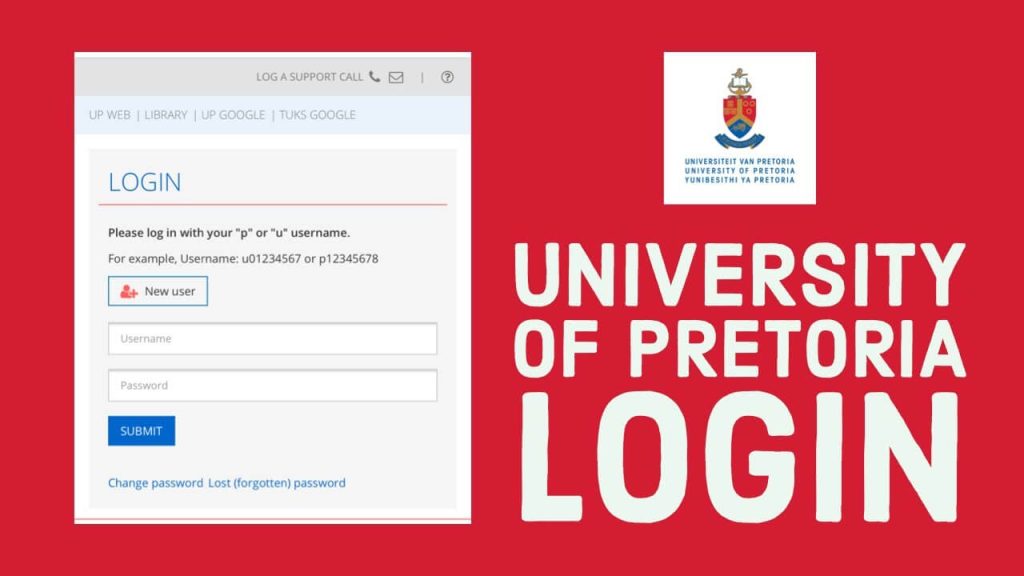
The UP Student Portal is the University of Pretoria’s online gateway for students and applicants. Through the portal, users can conveniently access important academic and administrative services, including application information, course registration, examination results, timetables, fee-related services, and other personalised student information.
The portal is available through upnet.up.ac.za, making it an important online platform for managing your University of Pretoria academic journey. According to the University of Pretoria, the UP Portal serves as a 24/7 gateway to information relevant to each student’s course and academic activities.
What Is the UP Student Portal?
The UP Student Portal, also known as the UP Portal, is an online self-service platform designed for University of Pretoria students and applicants. Once you have received a UP student number and activated your login account, you can use the portal to access services and information associated with your studies.
Some of the key services available through the portal include:
- Academic calendar
- Online application information
- Application status
- Examination results
- Course registration
- Acceptance fee payments
- Tuition and other fee payments
- Personal timetables


The information displayed after login may differ from one user to another because the portal provides details based on the user’s role and academic profile.
How to Access the UP Student Portal
To access the University of Pretoria student portal, visit the official UP Portal login page:
You can also begin from the University of Pretoria official website and select the relevant My UP Login option.
Generally, you will need your UP username and password to sign in. The username commonly consists of the letter “u” followed by your UP student number, for example, u12345678.
How to Log In to the UP Student Portal
Follow these simple steps to log in:
- Open your preferred web browser.
- Visit the UP Portal at upnet.up.ac.za/portal.
- Enter your UP username.
- Enter your password.
- Click Login to access your account.
After successfully signing in, you can navigate to the relevant sections of the portal, including the Student Centre, where you can access various personal and academic services.
How to Activate Your UP Portal Account
If you are a new user, you may first need to activate your UP Portal account and create a password.
According to the University of Pretoria’s registration guidance, new users can select the “New users” link on the UP Portal login page. You will then use your username, based on your UP student number, and follow the account setup process. This includes creating and saving a password and selecting challenge questions for account security.
Applicants can access the UP Student Portal after receiving a UP student number.
What Can You Do on the UP Student Portal?
The UP Portal brings several important university services together in one convenient location. Depending on your status and access permissions, you may be able to:
Check Your Application Status
Applicants can use their portal access to review information relating to their university application and monitor their application status.
Register for Courses
Students can use the UP Student Portal for online registration. Before registering, it is important to check for any holds on your account, as these may prevent successful registration. The University of Pretoria advises students to log in, open the UP Student Centre, and check the relevant section for holds.
View Examination Results
The portal provides access to examination results, allowing students to check their academic performance online.
Access Your Timetable
Students can view timetable information through their personalised UP Portal account, helping them stay organised throughout the academic year.
Manage Fees and Payments
The UP Portal includes services related to acceptance fees and other university payments. This allows eligible users to manage important financial requirements online.
Access the Student Centre
The Student Centre is an important part of the UP Portal. It provides access to personal and academic information and may also contain services such as online contracts and supporting documentation, depending on your student status.
Forgot Your UP Portal Password?
If you have forgotten your password, you can use the “Lost password” option available on the UP Portal login page.
You will generally be asked to provide your username and follow the password recovery instructions. If you continue experiencing difficulties, the University of Pretoria recommends contacting the IT Help Desk for assistance.
UP Student Portal Login Tips
To avoid login problems and protect your account, keep the following tips in mind:
- Make sure you enter your username correctly.
- Remember that your username may begin with “u” followed by your student number.
- Keep your password private and do not share it with others.
- Use the official University of Pretoria portal when entering your login details.
- If you forget your password, use the official password recovery option.
- Check your UP Portal regularly for academic and administrative updates.
- Contact the relevant UP support service if you cannot resolve an account or access problem.
The University of Pretoria also advises students to access their portal regularly to stay informed about information relating to their studies.
Why the UP Student Portal Is Important
The UP Student Portal helps reduce the need for students to visit campus for every administrative task. From checking academic information to managing registration and viewing results, the portal provides a central place for many essential university services.
For new applicants, it can help with monitoring application-related information. For registered students, it serves as an important tool for keeping track of registration, academic calendars, examination results, timetables, payments, and other personalised information.
Because registration dates, services, and procedures can change, students should always confirm important information through official University of Pretoria channels.
UP Student Portal Contact and Support
If you are unable to access your account or need technical assistance, you can contact the University of Pretoria’s IT support services. The university’s official student portal information lists the IT Help Desk as a source of assistance for login and access difficulties.
For the most reliable and current information, visit the official University of Pretoria Student Portal information page.
Conclusion
The UP Student Portal at upnet.up.ac.za is an essential online platform for University of Pretoria students and applicants. It provides convenient access to a range of academic and administrative services, including application status, course registration, exam results, timetables, fee services, and personalised student information.
Whether you are a new applicant setting up your account or a current student managing your academic activities, regularly checking the UP Portal can help you stay informed and organised. Always use official University of Pretoria resources when accessing your account or seeking support.
(FAQs) About the UP Student Portal
1. What is the UP Student Portal?
The UP Student Portal is the University of Pretoria’s online platform where students and applicants can access important academic and administrative information. Available services include application status, academic calendars, examination results, course registration, fee payments, and timetables.
2. How do I access the UP Student Portal?
You can access the portal through the official UP Portal login page. Applicants and students generally need a UP student number and their personal login credentials to use the system.
3. Can I access the UP Student Portal before receiving a student number?
No. According to the University of Pretoria, applicants can access the UP Student Portal once they have received a UP student number.
4. What is my UP Portal username?
Your username is generally the letter “u” followed by your eight-digit UP student number, for example, u12345678.
Also Read: Infiox.com: A Complete Guide to the Technology, E-Commerce, and Business Platform
5. How do I create my UP Portal account?
New users should select the “New users” option on the UP Student Portal login page. You will then follow the account setup process, create a password, and select and answer the required security questions.
6. What should I do if I forget my UP Portal password?
Use the “Lost password” option on the login page and provide your username to begin the password reset process. If you still cannot access your account, contact the UP IT Help Desk for assistance.
7. What can I do through the UP Student Portal?
Depending on your student status and permissions, you can access services such as:
- Checking your application status
- Viewing examination results
- Registering for UP courses or modules
- Viewing your timetable
- Accessing the academic calendar
- Making acceptance fee payments
- Managing fee-related information
8. How do I check my application status?
After receiving your UP student number and setting up your portal access, you can log in to the UP Student Portal and check information relating to your application status.
9. How do I register for courses on the portal?
Log in to the UP Student Portal and access the Student Centre or relevant academic registration section. Before registering, check whether there are any holds on your account, as holds may prevent successful registration.
10. Why am I unable to register?
Registration problems can occur when there is a hold on your student account. Holds may result from issues such as outstanding requirements or fees. Log in to the portal, open the UP Student Centre, and check the relevant section for any holds that need attention.
11. Can I view my examination results on the UP Student Portal?
Yes. Examination results are among the academic services available through the UP Student Portal.
12. Can I view my timetable online?
Yes. Students can access timetable information through their personalised UP Portal account.
13. Can I pay university fees through the portal?
The UP Student Portal provides access to services relating to the payment of acceptance fees and other university fees. Available options may depend on your student account and status.
14. How do I access my Student Centre?
Log in to the UP Student Portal using your username and password, then select the UP Student Centre link to access your personal and academic information.
15. Can I check my residence application status on the portal?
Yes. The University of Pretoria states that students can view their residence application status through the UP Student Portal. Relevant placement information and letters may also be available through the portal.
16. How often should I check the UP Student Portal?
You should access the portal regularly to stay informed about information and updates relating to your studies, registration, academic activities, and other university requirements.
17. Where can I get help if I cannot access my account?
If password recovery does not resolve the problem, you can contact the University of Pretoria’s IT Help Desk for assistance. The official UP Student Portal information also provides support details for users experiencing login difficulties.
18. Is the UP Student Portal available for applicants and current students?
Yes. Applicants can use the portal after receiving a UP student number, while registered students can use it to access personalised academic and administrative services.